Want to automatically receive updates whenever there's a new order, customer feedback, or an email subscription on your website?
With Sheetany's Webhook feature, you can instantly and automatically send event data to your own system.
🛠 What is a Webhook?
A webhook is a way for Sheetany to send real-time data to your specified URL whenever an event happens. For example, when a new order is placed, Sheetany will send the order data directly to your server.

✨ Steps to Set Up Webhooks in Sheetany
1. Go to Webhook Settings
- Log in to your Sheetany dashboard
- Navigate to the Webhook Settings tab
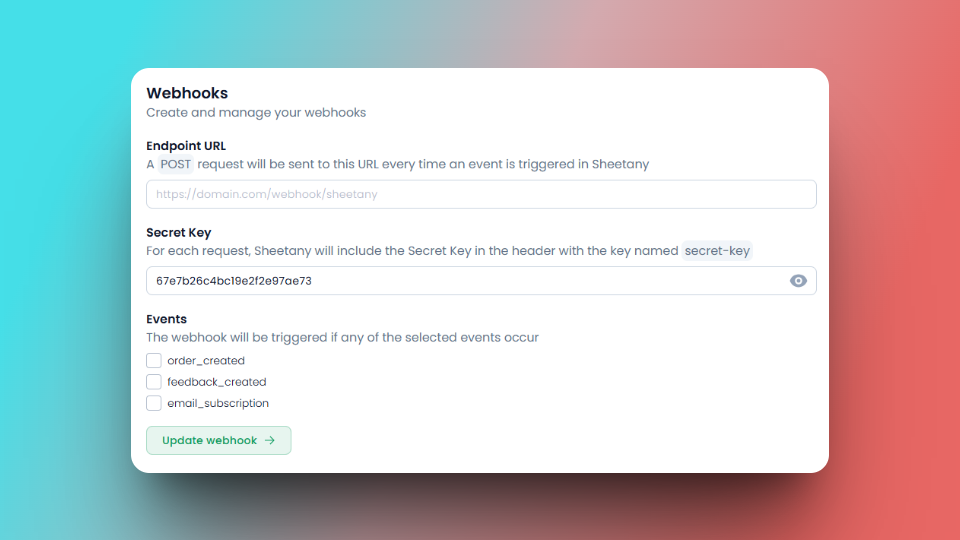
2. Enter Your Endpoint URL
- This is the URL where Sheetany will send the event data.
- Requirement: The URL must accept HTTP POST requests.
- Example: https://yourdomain.com/webhook/sheetany
3. Add a Secret Key
- Enter a Secret Key to secure the connection between Sheetany and your server.
- This key will always be included in the webhook request header as secret-key.
4. Select the Events You Want to Receive
Tick the checkboxes for the events you want Sheetany to send:
- ✅ order_created – When a new order is placed
- ✅ feedback_created – When a customer submits feedback
- ✅ email_subscription – When someone subscribes via email form
5. Click “Update”
Click the Update button to save your settings — and you're done!
✅ How It Works
Once configured, Sheetany will automatically send a JSON payload to your endpoint via HTTP POST each time a selected event occurs.
Example: Payload for a new order

Your server must always return a success response (e.g., HTTP 200 OK) with a simple message like "success" to ensure reliable webhook delivery.
🔐 Security: Signature in Every Request
Sheetany automatically includes your Secret Key as a signature in every webhook request header:
secret-key: your-secret-key
You can use this header to validate that the request came from Sheetany before processing it.
🎉 That’s It!
Now your system is fully integrated with Sheetany via Webhooks. Whenever an order is placed, feedback is submitted, or a new email subscriber signs up — your endpoint will receive the data instantly and securely.
👉 Sheetany – Build beautiful, functional websites with Google Sheets + Docs. No code. No hassle. Just results.